Table of content

Use this comparing fractions calculator to compare two fractions in seconds. Enter the values, and the tool shows which fraction is greater, smaller, or equal. It’s a quick option for homework, checking answers, and working with fraction comparisons in everyday math.
Using the comparing fractions calculator is simple. Enter the two fractions you want to check, and the tool will show which one is greater, smaller, or if both are equal. This is a quick way to compare values without doing the math manually.
Enter the first fraction by typing its numerator and denominator into the input fields.
Enter the second fraction in the next set of fields.
Click the compare button to run the calculation.
View the result shown with the correct comparison symbol: greater than (>), less than (<), or equal to (=).
Check any extra details provided, such as decimal values, simplified fractions, or comparison steps.
This layout makes it easy to use the tool whether you need a fast answer for homework, a worksheet, or a quick fraction check.
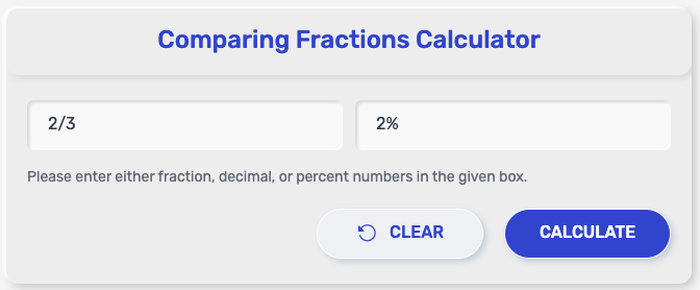
This fraction comparison tool is designed for quick, clear results. Whether you want to check which value is larger or confirm whether two fractions are equal, the calculator gives you a direct answer without extra work.
It can be used to:
compare two proper fractions
compare two improper fractions
compare fractions with the same denominator
compare fractions with different denominators
compare fractions with the same numerator
show whether one fraction is greater than, less than, or equal to another
display the correct comparison symbol: >, <, or =
convert fractions into decimals for easier comparison, depending on the tool setup
simplify fractions before showing the final result, if that feature is included
This makes the calculator useful for schoolwork, self-checking, and quick fraction comparisons when you want a fast answer with less chance of error.
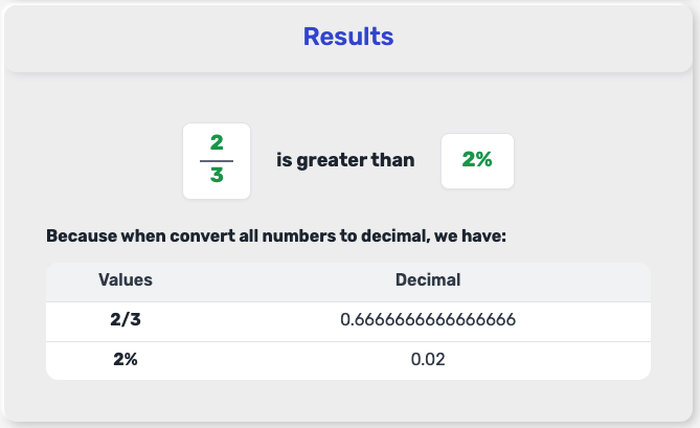
After you enter two fractions and run the comparison, the calculator will show a symbol that explains the relationship between them. This is the main result most users want, and it gives a clear answer right away.
If the result shows >, the first fraction is greater than the second fraction. If the result shows <, the first fraction is less than the second fraction. If the result shows =, both fractions have the same value, even if they look different at first.
In some tools, you may also see extra details such as decimal values or simplified fractions. These make the comparison easier to read, especially when the fractions have different denominators. For example, if one fraction equals 0.75 and the other equals 0.50, the first fraction is greater.
This output is useful when you need a quick answer for homework, worksheets, or checking a fraction comparison without solving it by hand.
There is more than one way to compare fractions, and the best method usually depends on the numbers you are working with. Some comparisons are easy to spot right away, while others need one extra step. Knowing a few quick methods makes it easier to check answers and read the calculator result with more confidence.
When two fractions have the same denominator, the fraction with the larger numerator is greater. This is one of the fastest cases because the parts are already split into equal sizes.
Example: 3⁄8 and 5⁄8
Since 5 is greater than 3, 5⁄8 is greater than 3⁄8.
When the numerators are the same, the fraction with the smaller denominator is greater. That is because the whole is divided into fewer parts, so each part is larger.
Example: 3⁄4 and 3⁄5
Since fourths are larger than fifths, 3⁄4 is greater than 3⁄5.
For fractions with different denominators, one common method is to rewrite both fractions so they share the same denominator. After that, you only need to compare the numerators.
Example: 1⁄2 and 2⁄3
Convert them to sixths: 1⁄2 = 3⁄6 and 2⁄3 = 4⁄6
Now it is easy to see that 2⁄3 is greater.
Another quick method is turning each fraction into a decimal by dividing the numerator by the denominator. Then compare the decimal values directly.
Example: 3⁄4 = 0.75 and 2⁄5 = 0.4
Since 0.75 is greater than 0.4, 3⁄4 is greater than 2⁄5.
Cross multiplication is a fast way to compare two fractions without first finding a common denominator. Multiply the numerator of the first fraction by the denominator of the second, then do the reverse.
Example: compare 2⁄3 and 3⁄52 × 5 = 103 × 3 = 9
Since 10 is greater than 9, 2⁄3 is greater than 3⁄5.
These quick methods are useful when you want to compare fractions by hand, while the comparing fractions calculator gives you the result instantly with the correct greater than, less than, or equal sign.
This video shows a practical method for comparing fractions, including how to handle different denominators:
A comparing fractions calculator uses simple math rules to decide which fraction is greater, which is smaller, or whether both fractions are equal. One of the most common methods is cross multiplication, which works well when you compare two fractions with different denominators.
To compare a⁄b and c⁄d, use this formula:
a × d compared with c × b
After multiplying, read the result like this:
a × d > c × b, then a⁄b > c⁄da × d < c × b, then a⁄b < c⁄da × d = c × b, then a⁄b = c⁄dFor example, compare 2/3 and 3/5:
2 × 5 = 103 × 3 = 9
Since 10 > 9, 2/3 > 3/5.
Another way to compare fractions is to convert each one into a decimal:
a ÷ b compared with c ÷ d
This method is also useful, especially when you want to see the exact value of each fraction in decimal form. A comparing fractions calculator may use one or both methods to give a fast and accurate result.
Looking at a few common examples makes fraction comparison easier. In some cases, you can tell right away which fraction is greater. In others, it takes a quick decimal check, a common denominator, or cross multiplication. These examples show the kind of results a comparing fractions calculator gives instantly.
1/2 vs 1/3 → 1/2 is greater
Since one half is larger than one third, the first fraction is greater.
3/4 vs 2/3 → 3/4 is greater
As decimals, 3/4 = 0.75 and 2/3 ≈ 0.67.
2/5 vs 3/5 → 2/5 is less
The denominators are the same, so compare the numerators. Since 2 is less than 3, 2/5 is smaller.
5/6 vs 4/5 → 5/6 is greater
Using decimals, 5/6 ≈ 0.83 and 4/5 = 0.80.
3/7 vs 4/9 → 3/7 is less
Cross multiplication gives 3 × 9 = 27 and 4 × 7 = 28, so 3/7 is smaller.
3/5 vs 6/10 → equal
Even though they look different, both fractions have the same value.
7/8 vs 5/6 → 7/8 is greater
As decimals, 7/8 = 0.875 and 5/6 ≈ 0.83.
4/3 vs 5/4 → 4/3 is greater
These are improper fractions, but they can still be compared the same way. 4/3 ≈ 1.33 and 5/4 = 1.25.
These examples show why a greater than less than calculator for fractions is useful. Instead of working through each step by hand, you can compare two fractions quickly and get the correct symbol right away.
Common Core State Standards Initiative – Grade 3 » Number & Operations—Fractions
https://thecorestandards.org/Math/Content/3/NF/
Common Core State Standards Initiative – Grade 4 » Number & Operations—Fractions
https://thecorestandards.org/Math/Content/4/NF/
Khan Academy – Equivalent Fractions and Comparing Fractions
https://www.khanacademy.org/math/cc-third-grade-math/equivalent-fractions-and-comparing-fractions
Math Is Fun – Comparing Fractions
https://www.mathsisfun.com/comparing-fractions.html
LibreTexts – 2.1.5: Comparing Fractions
https://math.libretexts.org/Bookshelves/Applied_Mathematics/Developmental_Math_%28NROC%29/02%3A_Fractions_and_Mixed_Numbers/2.01%3A_Introduction_to_Fractions_and_Mixed_Numbers/2.1.05%3A_Comparing_Fractions
Yes. A comparing fractions calculator is also a which fraction is bigger calculator because it shows which fraction has the larger value right away.
Yes. Some fractions look different but represent the same value. For example, 1/2 and 2/4 are equal, so the calculator would show =.
This usually happens when the fractions have different denominators or when the greater than and less than symbols are mixed up. It can also happen if one of the fractions was entered incorrectly.
Yes. It is a quick way to check fraction comparisons, confirm answers, and see the correct greater than, less than, or equal sign without solving every problem by hand.
Fractions can be tricky, but comparing them should not feel harder than it needs to. Comparingfractionscalculator.com tool was created to help students, parents, teachers, and everyday learners quickly see which fraction is greater, smaller, or equal with less confusion and more confidence. It’s a simple tool built to make math comparisons faster, clearer, and easier to understand.
This tool was developed by the comparingfractionscalculator.com team, with contributions from developers, education-focused writers, and calculator specialists who care about turning challenging math tasks into straightforward digital tools.
We believe learning tools should feel clear, helpful, and easy to trust.
comparingfractionscalculator.com tool does not require an account or personal information. Any fractions or values you enter are used only to generate results and are not stored or shared.
This tool is designed to provide accurate fraction comparisons based on the inputs you enter. However, users should still review results when using them for homework, teaching materials, assessments, or other situations where precision is important.
The calculator is meant for learning, practice, and quick reference. It is designed to help users better understand fraction relationships, but it should not replace detailed instruction or careful review when deeper explanation is needed.
We may improve this tool and revise this Policy from time to time. Any updates will be posted here so the information remains clear, current, and transparent."